
⚠️ This only works with subscription channels. Livestream tickets and direct content payment links don’t support promos.
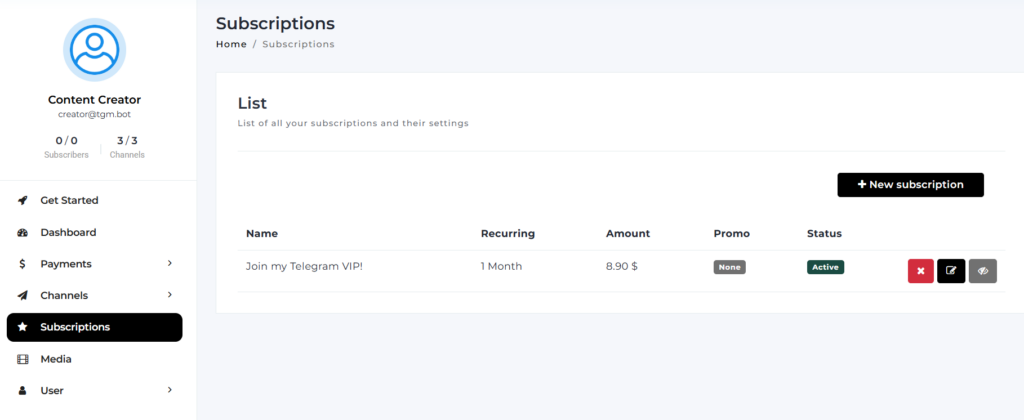
1. Go to Subscriptions
From your dashboard, go to Subscriptions, then tap “+ New Subscription.”
2. Set your regular price
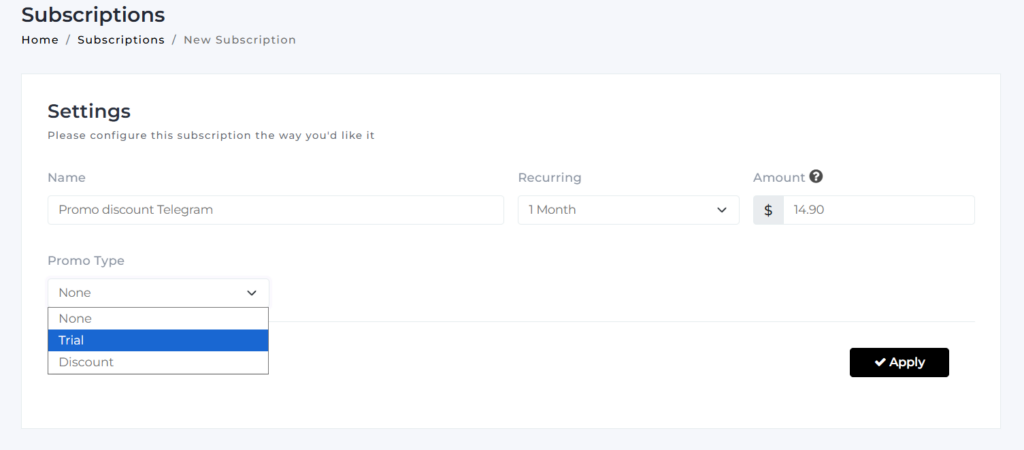
Fill in the Name, Recurring period, and Amount, this is what the fan pays once the promo period ends.
3. Choose your Promo Type
- Trial: give new subscribers a set period before full price kicks in. Choose the trial length (Days, Weeks, Months), how many of that unit, and the Trial Amount,
- Discount: give new subscribers a reduced price for a dedicated time. Set the Duration (in months) and the Discount Percent.
4. Save it
Tap Apply. Your promo is now live on that subscription.
💡 Good to know
- The promo only applies to new subscribers signing up through this subscription, it doesn’t retroactively change what existing subscribers pay.
- Once the trial or discount period ends, billing automatically switches to the regular price you set in step 2, no action needed from you or the fan.