
Telegram has a built-in setting called Restrict Saving Content that keeps your posts from being copied or shared outside your channel.
Screenshots shown are from Telegram Desktop. Your app may look slightly different depending on your device, but the steps are the same.
1. Open your channel settings
Go to your channel, tap the channel name, then Edit or Manage Channel.
2. Find Channel Type
Tap Channel Type, then scroll down to Restrict Saving Content.
3. Turn it on
Toggle it on, then save. This applies instantly to the whole channel.
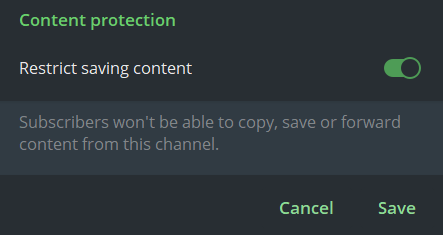
What this actually blocks:
- Members can’t forward your messages or media to other chats
- Members can’t download or save your photos and videos
- On mobile devices, taking a screenshot shows a blank screen instead
💡 Good to know
- This applies to everyone, including other admins, once it’s on, nobody in the channel can screenshot, forward, or save, no exceptions.
- It’s an all-or-nothing setting per channel, you can’t restrict just one specific post.
- This setting only applies to channels and groups. In a 1:1 private chat, Telegram assumes both people consent to exchanging that media, so the same protections don’t apply there.
- This isn’t unique to Telegram, once you sell direct access to content, the same is true on other platforms too.