
By default, Telegram uses your phone number to set up your account, but you don’t have to show it to anyone. Here’s how to lock it down.
Screenshots shown are from Telegram Desktop. Your app may look slightly different depending on your device, but the steps are the same.
1. Hide your number from other users
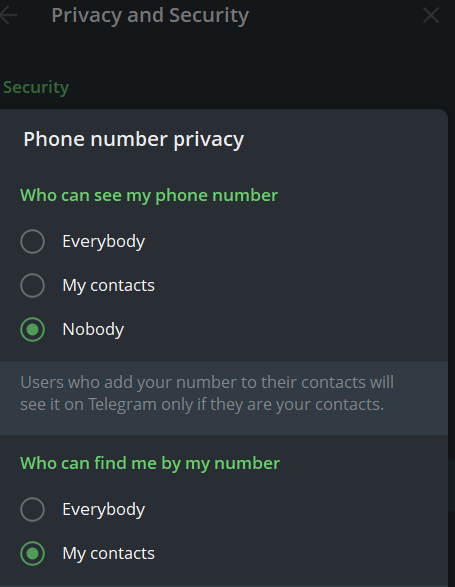
Go to Settings > Privacy and Security > Phone Number. Under “Who can see my phone number,” select Nobody.
2. Control who can find you by your number
In the same menu, there’s a separate setting for “Who can find me by my number.” Set this to My Contacts, this stops strangers from discovering your account just by having your number saved.
3. Set a username instead
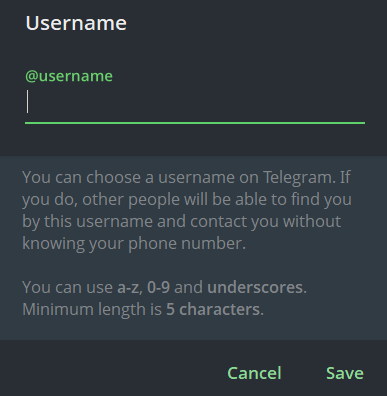
Go to Account > Username, and choose one. Unlike your phone number, a username is always public and searchable, that’s what makes it useful: fans can find and message you without ever seeing your real number.
4. Block yourself from being found through forwarded messages
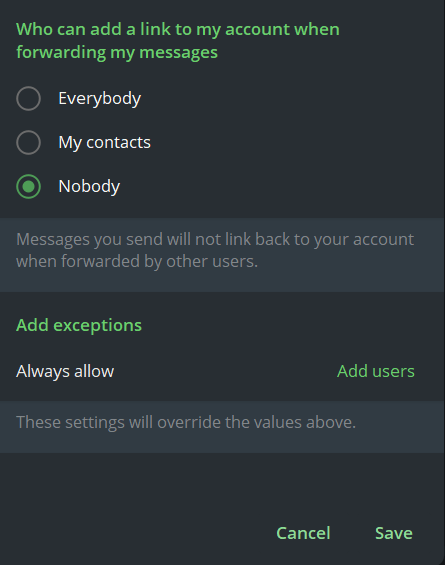
Go to Settings > Privacy and Security > Forwarded Messages, and set it to Nobody. Without this, a message you send could get forwarded to someone you’ve never met, and Telegram may still link back to your profile from it.
💡 Good to know
- Hiding your number stops strangers from seeing it, it doesn’t erase it. Anyone who already had your real number saved in their contacts before you hid it may still see it on their end.
- These settings only affect what other Telegram users can see, Telegram itself still needs your number to run your account.
- ⚠️ Skipping a username entirely makes you harder to find, but it also cuts off how new fans and potential clients discover and message you. For most creators, that trade-off isn’t worth it, a username is what replaces your number as your public identity, not something to avoid.
Next: [How to protect your content in Telegram?] 🔒