
Whether you’re a streamer, cam model, influencer, or educator, here’s how to set up your first paid livestream in just a few steps.
1. Create a dedicated channel
Set up a streaming channel following this tutorial.
2. Set your price and get your link
Once your channel is ready, set your price and grab your shareable link.
3. Schedule it inside Telegram
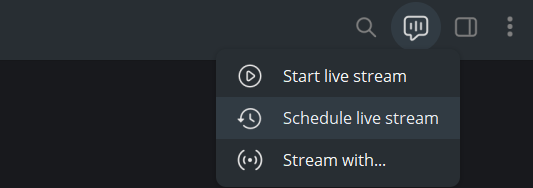
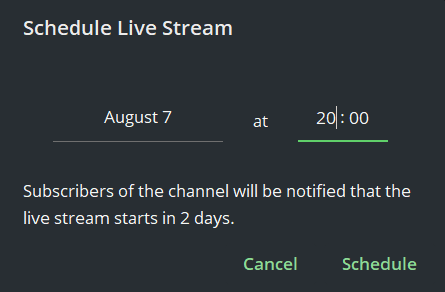
Use Telegram’s built-in scheduling so everyone who joins gets notified the moment it starts. Look for it at the top of the channel’s menu and select Schedule live stream
4. Set clear expectations on duration
Decide how long your livestream will run, and be upfront about it when you promote it. ⚠️ This matters more than it sounds: if you promote a “30-minute exclusive livestream” and it runs for 10 minutes, fans will feel misled and may ask for refunds. Setting the right expectation from the start protects both you and them.
Example promo post:
🔴 Exclusive livestream this Friday, 8:00 PM PT! 45 minutes, just for my Telegram VIPs.
🎟️ Grab your spot here: [your link]
Give fans enough notice to buy their ticket and clear their schedule, promoting a few days ahead usually works better than same-day.
What happens when a fan pays?
Once someone buys a ticket, they’re added to the channel right away, even if that’s days before the livestream starts. Keep reminding them when it’s happening (a daily reminder or two in the lead-up works well), and stay clear about the date and time so nobody misses it.
Can a fan join without paying?
No. Anyone who tries to access the channel without completing payment through your link is automatically removed by the TGM Bot’s security system.
What happens when the livestream ends?
Once you finish successfully, the system removes everyone from the channel after a short grace period. If your stream cuts off early (connection issues, for example), you can restart it during that same grace period without losing your audience. The channel itself can be reused for future livestreams, or you can create a new one each time, it’s up to you.
Next: [Can I do 1:1 video call sessions?] 🎥
💡 Want to avoid refund requests and unhappy fans? Check out [What if my livestream doesn’t go as planned?] before your first session.