
🗒️Note: You don’t need a subscription or stream channel to sell content. These are separate features. You can sell directly without setting either one up.
The Bot option /payment_request is your all-purpose payment link, think of it like a PayPal.me for Telegram. Use it to sell photos, videos, files, courses, or just receive tips or donations from your audience
1. Create your link
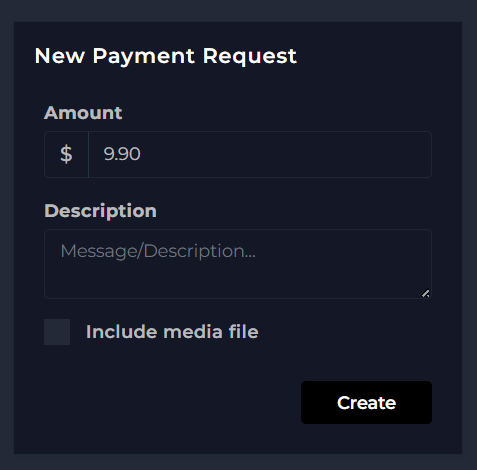
Open TGM Bot, tap /payment_request, then “+ New Link.” Set your amount and add a description.

2. Choose how you’ll deliver the content
This is the one decision that matters, everything else is the same either way:
- 🤖 Automatic delivery: check “Include media file,” then upload the content when the bot asks for it. Fans get it instantly after paying, no work from you.
- ✋ Manual delivery: leave “Include media file” unchecked. You’ll get notified when someone pays, then send the content yourself in a private chat. Some creators prefer this, it feels more personal and direct.
3. Get your link
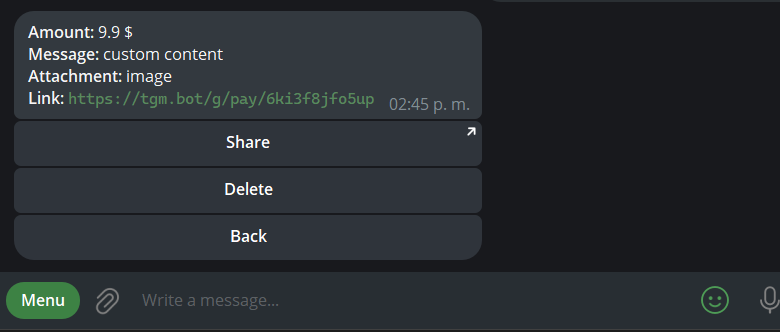
Use /payment_request again, select your link, and tap the link to copy it, or Share to send it directly to your Telegram contacts. Didn’t mean to create it? Tap Delete instead.
That’s it, one link works for every buyer, it doesn’t expire after the first sale. 🎉
💡 Good to know
- This all happens inside the bot, nothing to set up in the dashboard. Your dashboard only shows your transaction and earnings history.
- Fans don’t need a subscription or any prior registration, they can pay directly with no hassle.
- You can delete a payment link anytime to stop new sales on it.
Next: [What type of content can I sell?] 📁