
A free channel and your paid channel serve two completely different jobs, and each one has its own link. Mixing them up is an easy mistake to make, so here’s exactly how it works.
1. Create your free channel
This one doesn’t involve TGM.Bot at all, it’s just a regular Telegram channel. Open your Telegram menu, tap New Channel, give it a name and photo, and you’re done. No bot registration, no admin setup, nothing to link. Still make it Private!
2. Create your paid channel
This is the one that actually gathers payments. Follow [How do I create my first paid channel?] to set it up and connect it to TGM.Bot.
3. Know your two links, and where to use each
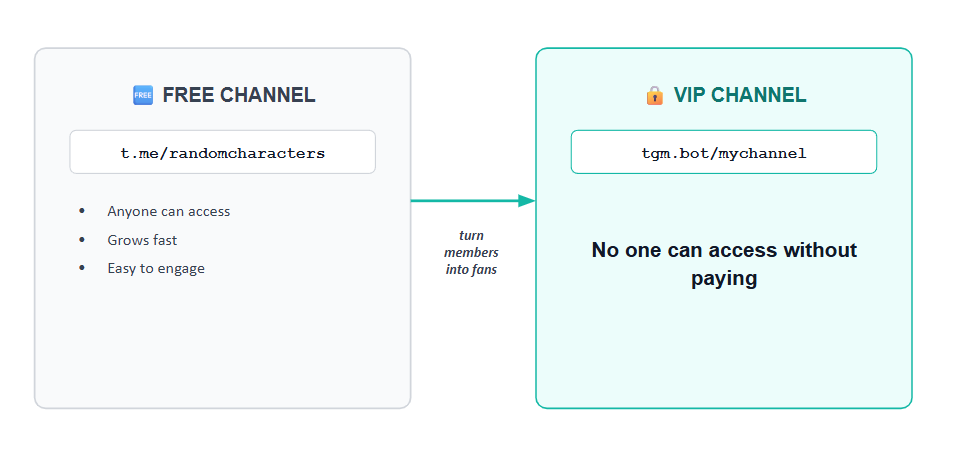
- Free channel link 🆓 (
t.me/randomcharacters): your awareness link. Use it to capture attention and grow your community, social posts, bios, casual mentions.
- Paid channel link 🪙 (
tgm.bot/mychannel): your monetization link. Use it once someone’s already in your world and ready to become a paying fan, a DM reply, a direct promo, or a post aimed at your free community.
Think of it as a funnel: the free link brings people in, the paid link turns them into income.
4. Guide free members toward your paid channel ⭐
Mention your paid channel naturally in your posts, and keep the tgm.bot link somewhere easy to find, like a 📌 pinned message, so anyone ready to upgrade doesn’t have to go hunting for it.
💡 Good to know
- Your free channel never needs to touch TGM.Bot, it works exactly like any other Telegram channel you’ve made before.
- The free channel is a sales funnel, not a required step. If you’re confident a fan will pay right away, feel free to send your paid link directly, anywhere, no need to route everyone through the free channel first.
- Keep both links saved somewhere you can grab quickly (bio, notes app, pinned message), so you’re never copying the wrong one by accident.
- Naming them clearly for yourself helps too, something like “[Your Name] Free” vs “[Your Name] VIP” makes it obvious at a glance which is which.
Next: [How to promote your paid links?] 🔗